Klaviyo is a marketing automation platform used to send personalised emails and messages based on customer behaviour.
The recipe retrieves user data from Klaviyo by accessing the selected List or Segment via the Klaviyo API and sends them SMS via FDX mobile number. If customer opts out, it will also update the customer marketing preferences in Klaviyo to ‘unsubscribe'
Downloading the recipe
Log in the FDX platform and follow the instructions:
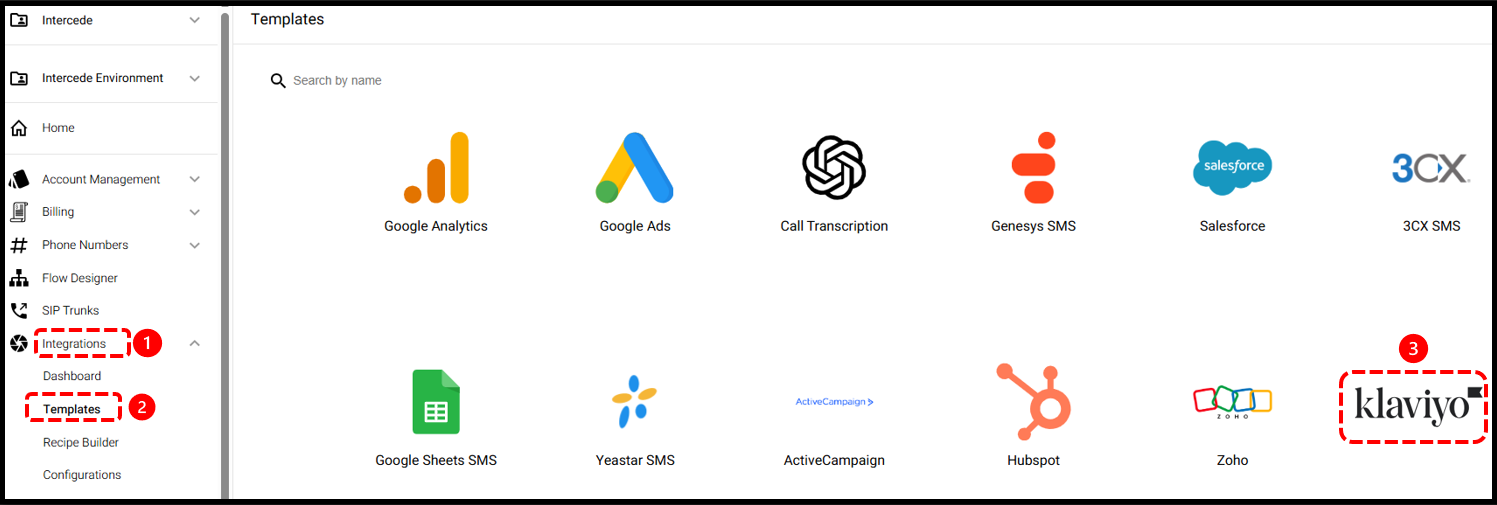
1.- Click ‘Integrations’
2.- Click ‘Templates'
3.- Select Klaviyo recipe
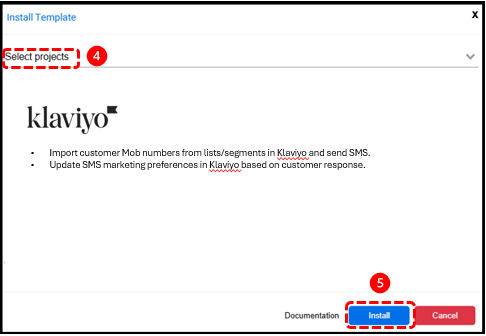
4.- Select the Project location in your FDX account
5.- Click ‘Install’
You should now see following two recipes downloaded in ‘Assets’:
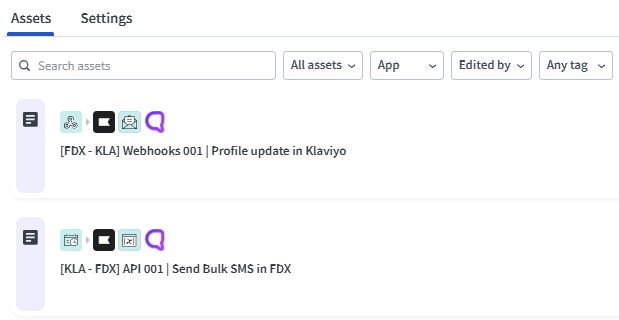
Recipe-1: Send Bulk SMS in FDX
This integration aims to:
1. Fetch List/Segment Data
Retrieve user data from Klaviyo by accessing the selected List or Segment via the Klaviyo API.
Extract required fields, including mobile number, first name, and any other attributes necessary for message personalisation.
2. Send Bulk SMS Messages
Iterate through each user record and send an SMS using the mobile number field as the recipient identifier.
Integrate with the FDX SMS gateway for message dispatch.
3. Track Message Delivery Status
Capture API responses for each message sent, identifying successful and failed deliveries.
Maintain two separate collections/lists:
SuccessList – users who successfully received the SMS.
FailureList – users whose messages failed due to invalid numbers or delivery errors.
4. Generate Summary Report
Compile both success and failure lists into a summary dataset. Configure the system to send this report automatically via email to relevant stakeholders.
5. Define Parameters
Text → String parameter containing the SMS message body.
From → String parameter representing the sender’s phone number or alphanumeric sender ID (as supported by the SMS service).
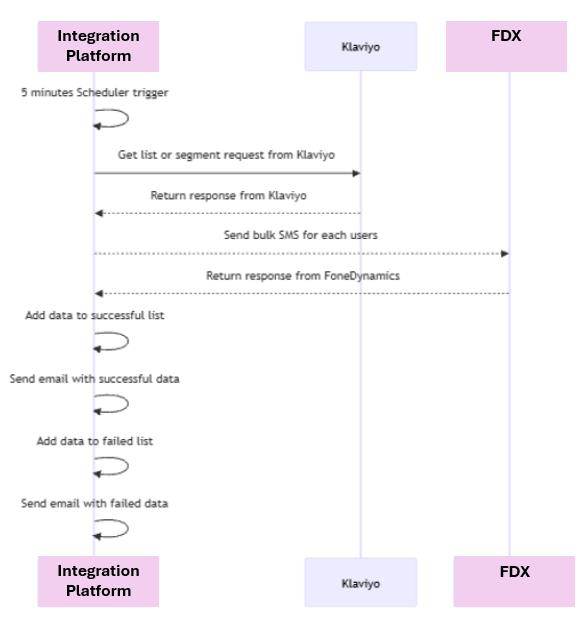
The flow diagram below shows the execution of the recipe
Setting up the recipe
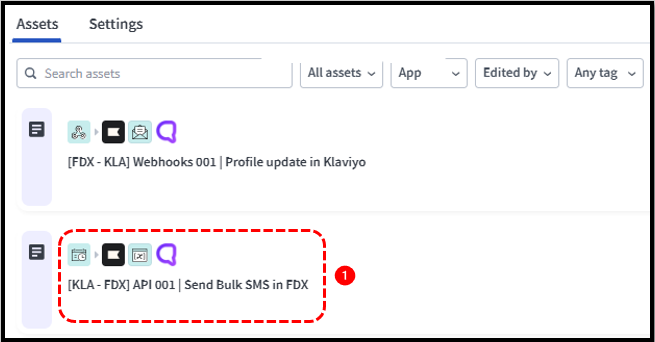
1.- Click on the recipe in ‘Assets’.
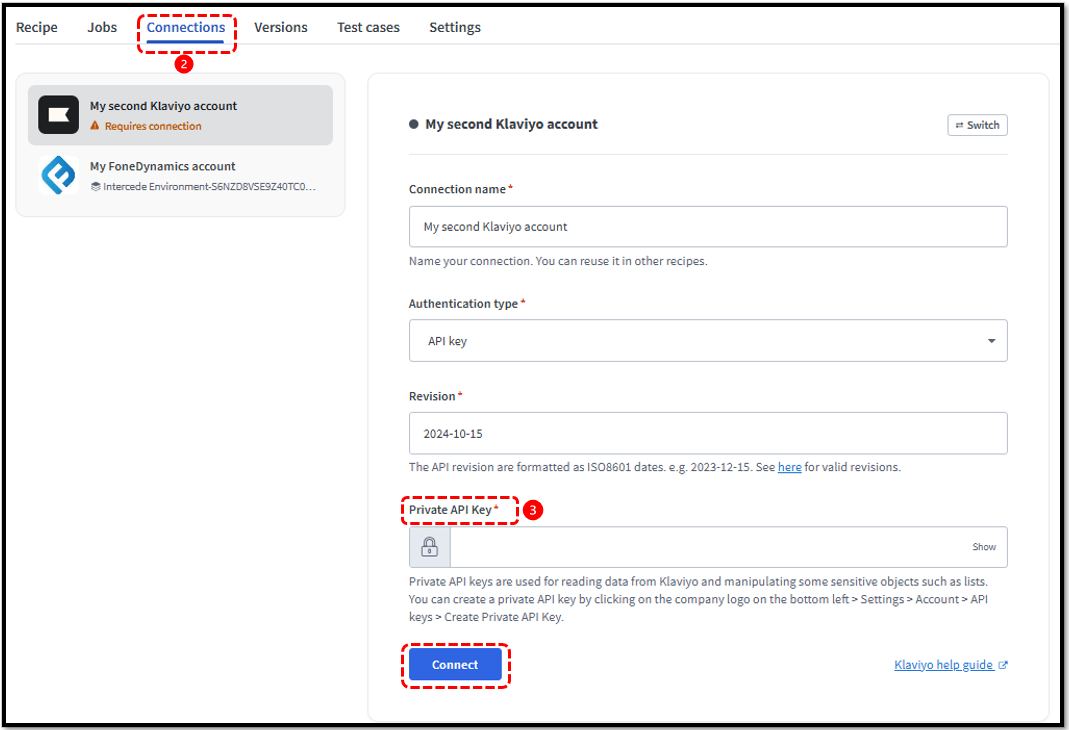
2.- Click ‘Connections’. You need to activate both Klaviyo and FDX connections to the recipe
3.- After clicking on the connection for Klaviyo connector, input the API key here (You can create a private API key in Klaviyo Account by clicking on the company logo on the bottom left > Settings > Account > API keys > Create Private API Key) and click ‘Connect’
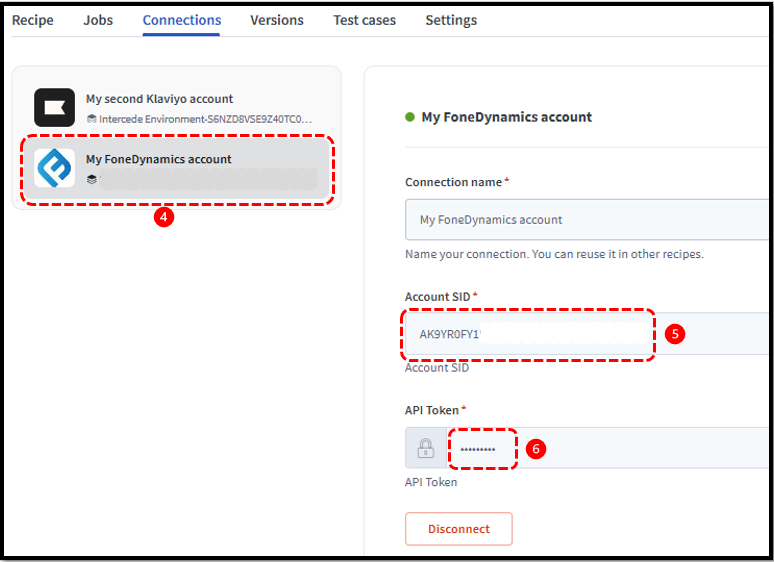
4.- Click the FDX account connection
5.- Paste the ‘Account SID’ here (You can copy the Account SID by revealing API credentials from FDX Home page)
6.- Paste the ‘API Token’ here (You can copy the Account API token by revealing API credentials from FDX Home page) and click ‘Connect’
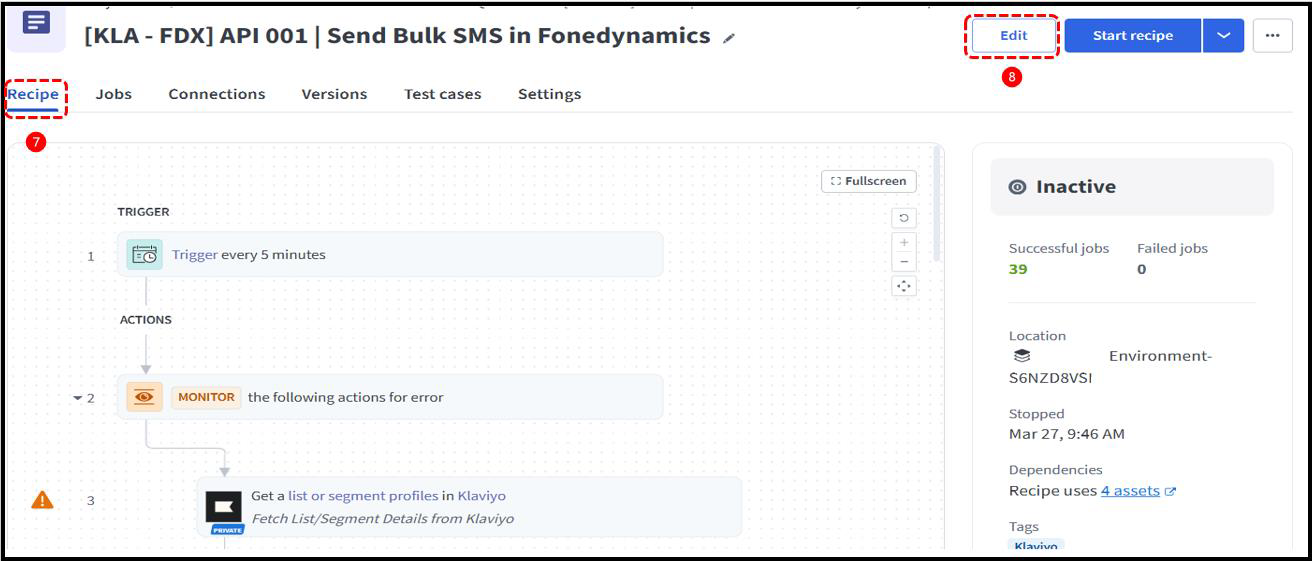
7.- Click ‘Recipe’
8.- Click ‘Edit’
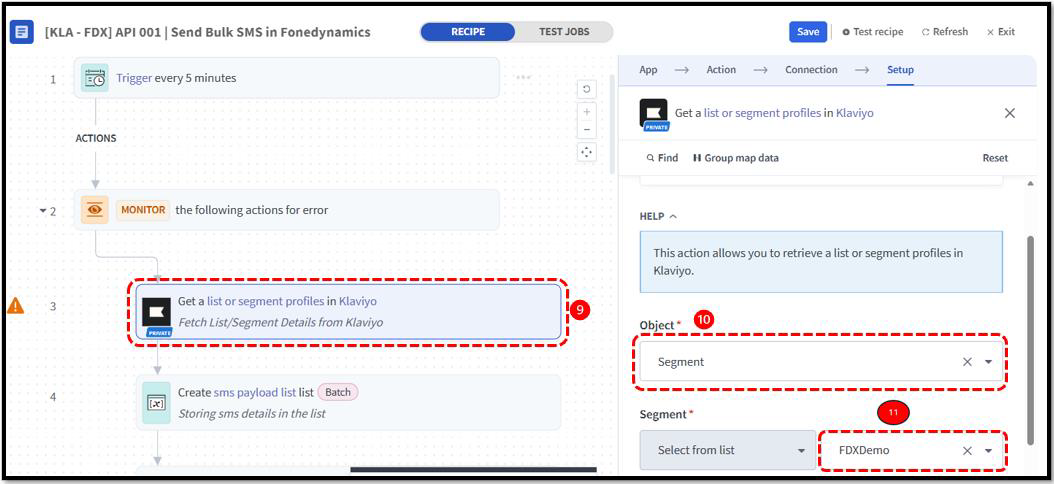
9.- Click on Step-3 of the recipe
10.- Select the object (segment or list) to fetch the customer profile details from Klaviyo
11.- Select the segment or list, or enter the Segment/List ID using the Use custom value option
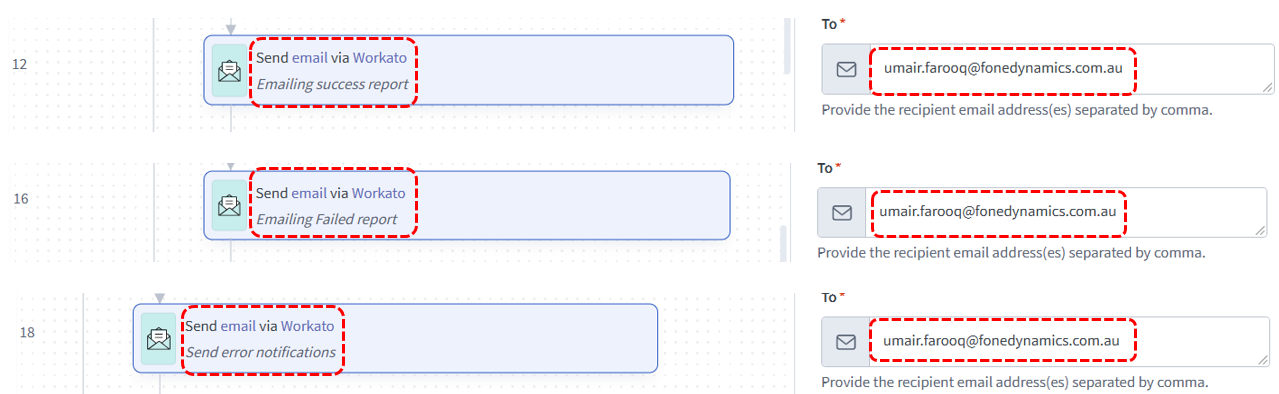
12.- Add the email address in steps 12, 16, and 18 of the recipe to receive the error, success/failure record CSVs
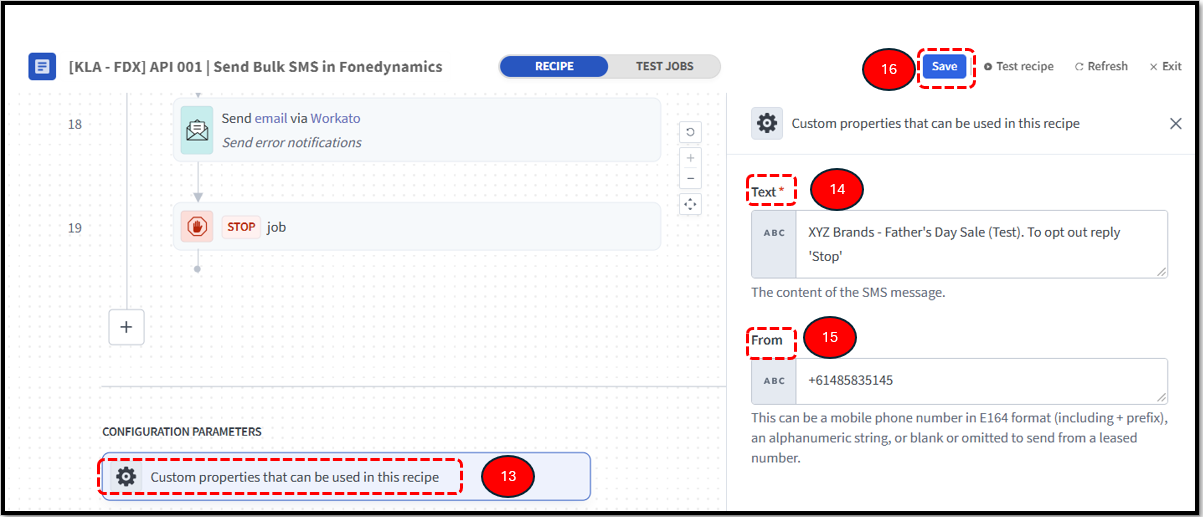
13.- Click on the ‘Configuration Parameters’ at the bottom of the recipe and
14.- Add the SMS text which you want to send to your customer
15.- Add the FDX mobile number to be used to send SMS
16.- Click ‘Save’
Recipe-2: Profile Update in Klaviyo
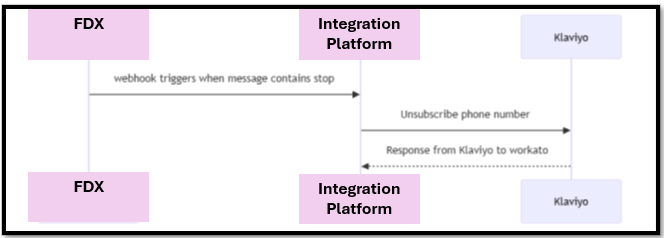
This recipe integrates Klaviyo and FDX ensuring that when a user has requested to opt-out of SMS marketing by replying to SMS sent via recipe-1, his profile is updated in Klaviyo to reflect that.
1. Synchronization
This synchronization maintains consistency between both platforms, ensuring compliance with communication preferences and preventing further SMS or email messages to unsubscribed users.
2. API Calls
The process is handled via API calls between FDX and Klaviyo, where unsubscribe events from FDX trigger an update to the associated profile in Klaviyo.
3. Error Handling
Error handling and logging are implemented to capture any failed updates, with notification alerts sent to the integration admin team.
The flow diagram below shows the execution of the recipe
Setting up the recipe
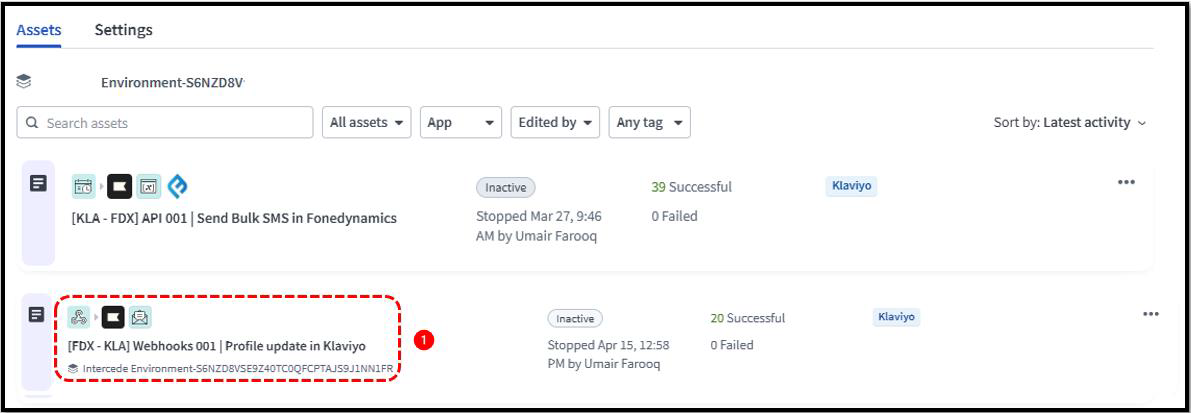
1.- Click on the recipe
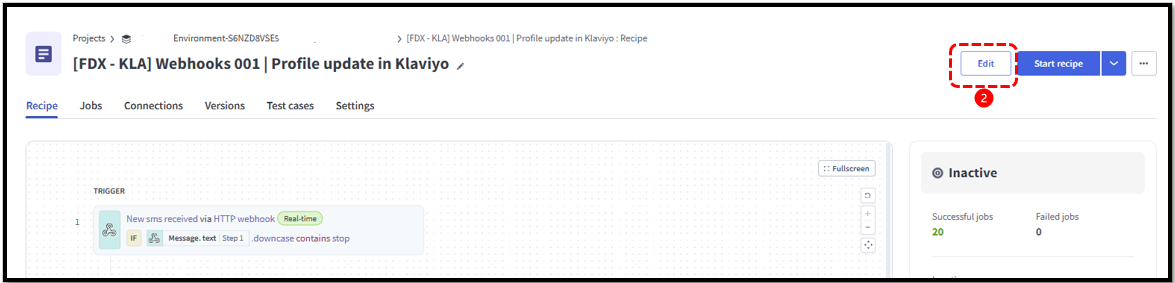
2.- Click ‘Edit’ to update the recipe
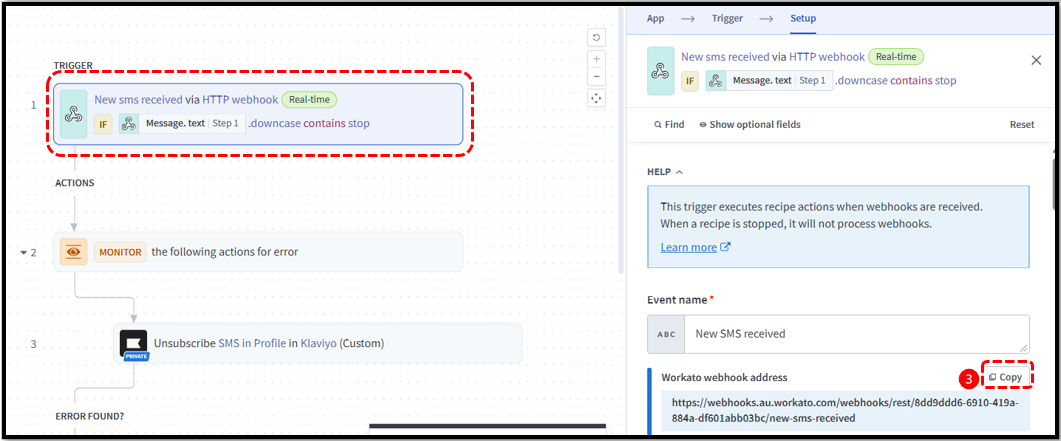
3.- Click on Step-1 of the recipe and ‘Copy’ the webhook address (this will be pasted in Step-5 below)
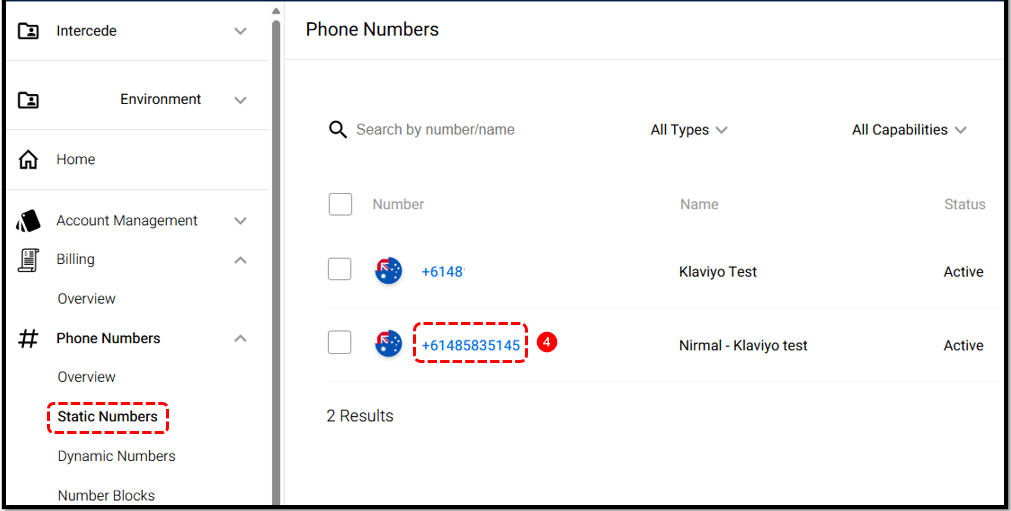
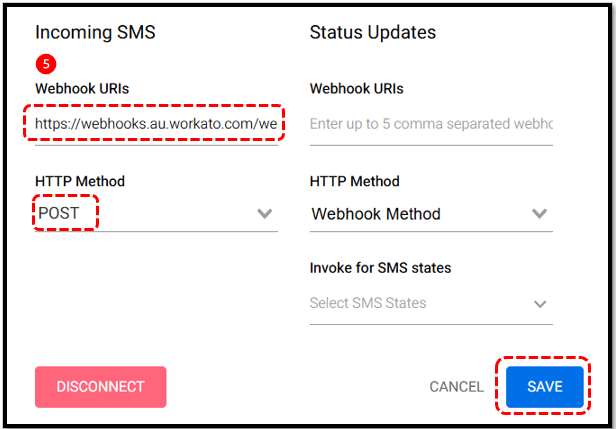
4.- Click on ‘Static Numbers’ under Phone Numbers in FDX platform and click on the number you want to send SMS from
5.- Paste the webhook copied from Step-3 here, set HTTP Method as ‘POST’ and click ‘SAVE’
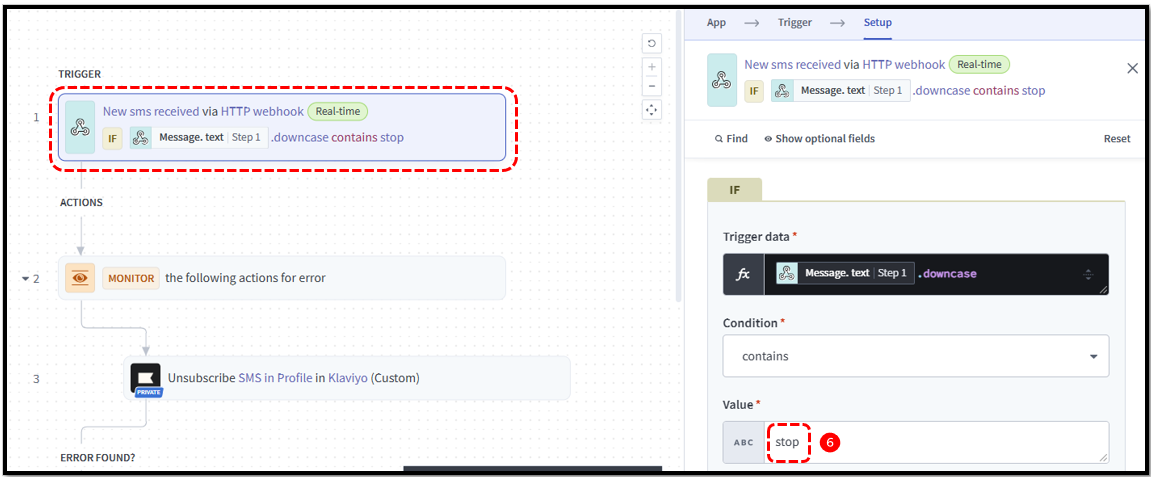
6.- Click on: Integrations→Assets→Recipe→Edit→Step-1 of the recipe
At the bottom of the setup, you will see the Trigger data. This is the response (stop) you are expecting to receive from the customer who want to opt-out for SMS marketing in Klaviyo. You can update this text as per your requirements.
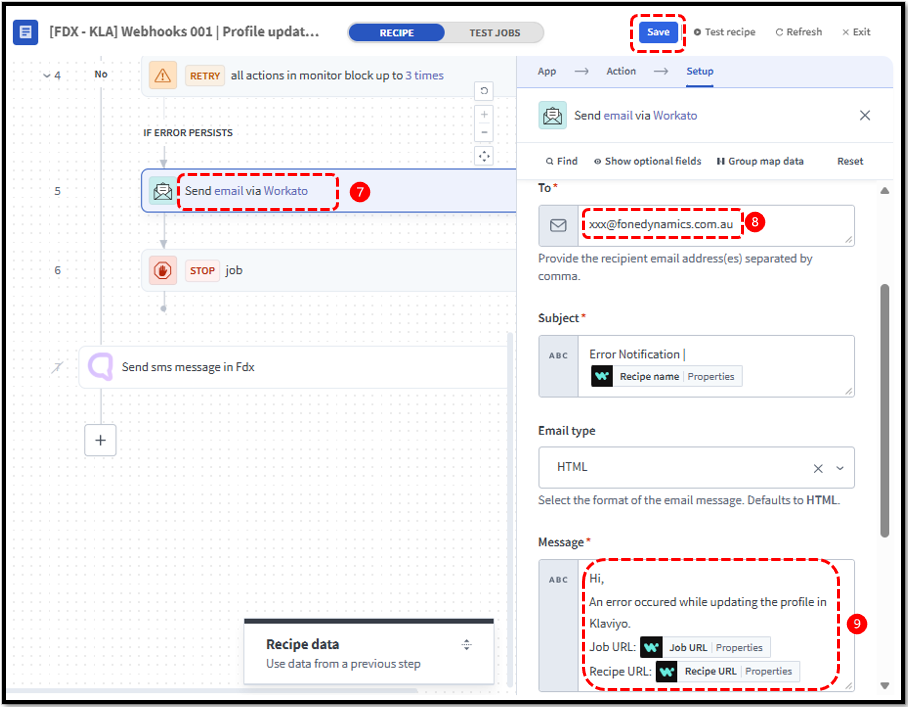
7.- Click on Step-5 of the recipe to add email address and message you wish to receive in case any error is encountered
8.- Add the email address here to receive the error email
9.- This is the message you receive in your email in case error is encountered. Click ‘Save’ to save the settings
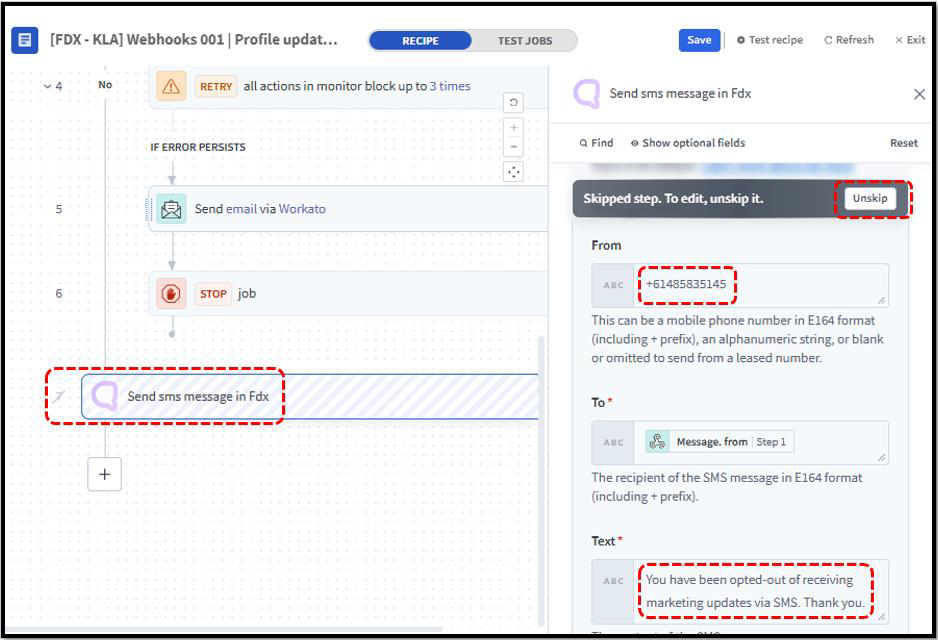
(Optional Step) Step-7 of the recipe is an optional step. By default, it is hidden. To enable it, click ‘Unskip’.
This will allow the recipe to send an SMS to the customer confirming successful opt-out from the SMS marketing list in Klaviyo
10.- Click ‘Start Recipe’
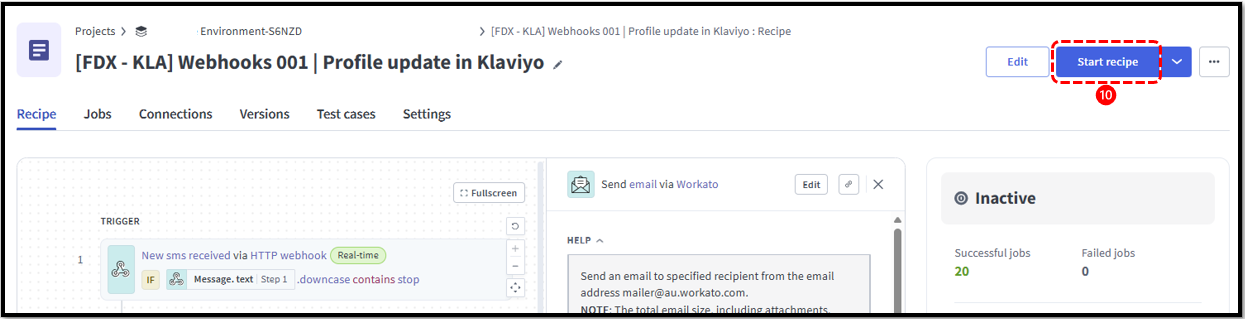
Running the Recipe
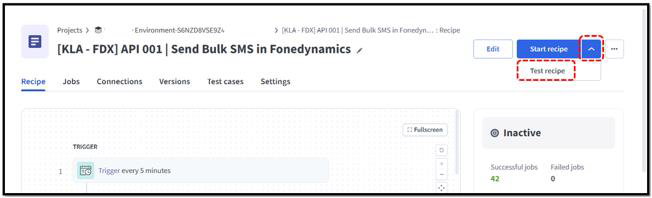
Ensure your (Recipe-2) ‘Profile Update in Klaviyo’ is running to record the responses from customers.
Now, click on (Recipe-1) ‘Send bulk SMS in FDX’ recipe and click on ‘Test Recipe’ as shown in the figure below. The reason why we click on ‘Test recipe’ is so that the recipe only sends a single SMS to all recipients and stops.
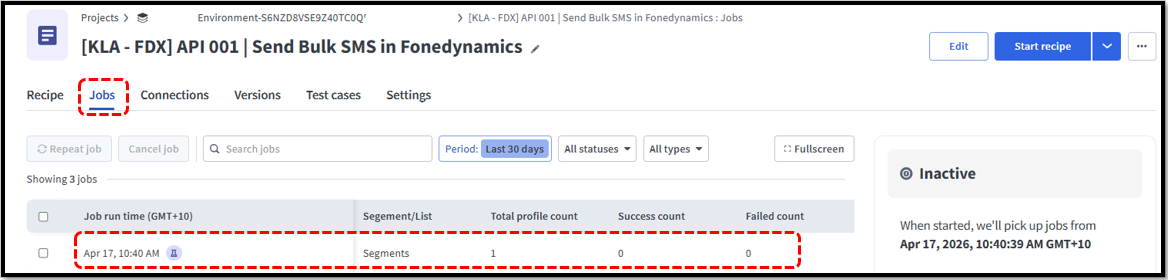
You can click on ‘Jobs’ to view the summary of the executed recipe as shown in the figure below. You can see here if you selected a list or a segment and how many profiles were taken from Klaviyo to send SMS to them.
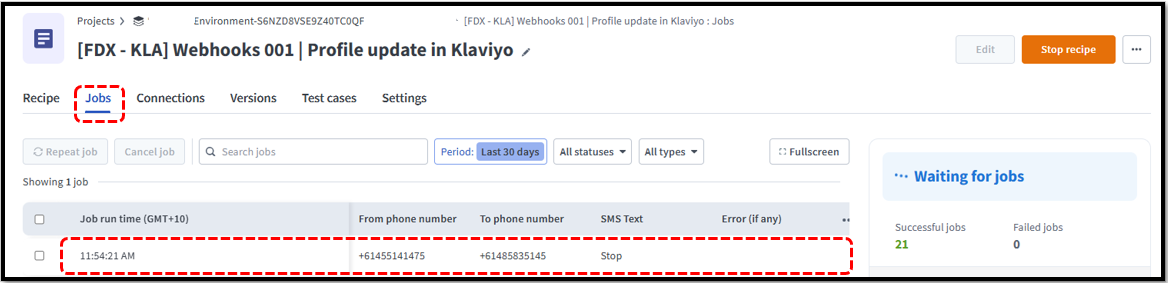
You also click on the ‘Jobs’ section of the Recipe-2 to view the responses from customers who have opted out of SMS marketing.
Was this article helpful?
That’s Great!
Thank you for your feedback
Sorry! We couldn't be helpful
Thank you for your feedback
Feedback sent
We appreciate your effort and will try to fix the article